Create a Web Page 101
Making Web Pages Intro
What is a Web Page?
Why Make a Web Page?
The History of HTML
Learn HTML or XHTML?
Basic HTML
Basic HTML Tutorials
Basic HTML Necessities
How to Make a Web Page
How to Edit a Web Page
The Basics of HTML Tags
Basic HTML Page Structure
HTML Attributes
HTML Font Codes
HTML Font Codes Intro
HTML Font Color Codes
HTML Font Size Codes
HTML Font Style Codes
HTML Bold/Italic Codes
Combining Font Codes
Formatting Text
Formatting Text Intro
Making Paragraphs
Miscellaneous Formatting
Headings & Subheadings
Creating Hyperlinks
Using Graphics
Using Graphics on the Web
Add Graphics to Your Pages
Graphics and Accessibility
How to Align Graphics
Page Color & Background
Graphics as Hyperlinks
Horizontal Rules
Creating Tables
HTML Tables Tutorials
HTML Table Fundamentals
Background & Border Color
Table Frames & Rules
Table Width and Alignment
Cells 1 -Space & Alignment
Cells 2 -Row Column Span
Cells 3 -Width & Height
Making Lists
HTML Frames
HTML Frames Tutorials
Using Frames for Layout
Advanced Frame Layouts
Putting Hyperlinks in Frames
Frame Border Width
Color, Margin and Control
Problems with Frames
SmartFrames: A Solution
SSI: An Alternative to Frames
Web Page Forms
Making Feedback Forms
A Simple Feedback Form
Installing NMS FormMail
Debugging Your Setup
My Web Host is Out to Lunch
User Input Components
Text Fields
Checkboxes & Radio Buttons
Dropdown Menus
Push Buttons
Layout and Presentation
Basic CSS
Basic CSS Tutorials
What is CSS?
Why You Should Use CSS
How to Use CSS
Inline Styles
Embedded Style Sheets
External Style Sheets
Class Selectors
ID Selectors
Combining Selectors
CSS Properties
CSS Properties Intro
Font Styles
Width, Height & Spacing
Borders
Backgrounds
Position
Float & Alignment
Hyperlinks
All About Web Hosting
Hosting Your Own Website
What is a Web Host?
Your Website's Home Page
Building a Website Offline
About Free Web Hosting
Best Free Web Hosting
Commercial Web Hosting
How to Get a Domain Name
Ecommerce Web Hosting
Web Hosting Terminology
Free Web Design Tools
Best Free Website Tools
Best Free Text Editors
Best Free Graphics Editors
Free Website Analysis Tools
Setting Up HTML Kit
HTML Kit Introduction
How to install HTML Kit
Screenshot Breakdown
Basic Configuration
Overall Appearance
Shortcuts and Startup
Editing Window
Customizing Toolbars
Using the Favorites Tab
Making a New Actions Bar
Odds and Ends
Free Templates
Free Website Templates
Two Column Fixed Width
Three Column Liquid Layout
Miscellaneous Templates
Dynamic Menu Effects
Two Column Experimental
Terms of Use
About These Templates
Website Templates Help
Getting Started
Template Zip File Download
How to Edit Your Template
What to Edit in the HTML
How to Add Your Logo
Making a Website
Web Design Tips
Web Design Basics
Tables vs. Tableless
Using Tables for Layout
Example Table Layouts
World's Crappiest Web Page
Twitter Backgrounds
Twitter Backgrounds Intro
Cool Twitter Backgrounds
Cool Twitter Backgrounds 2
Plain Twitter Backgrounds
Dark Twitter Backgrounds
Best Twitter Backgrounds
Cute Twitter Backgrounds
Music Twitter Backgrounds
Music Twitter Backgrounds 2
Twitter Backgrounds 101
TERMS OF USE
All About Web Browsers
What is a Web Browser?
Mozilla Firefox
Internet Explorer
Opera
How to Set Up Firefox
Top 5 Firefox Extensions
Contact
The Basics of HTML Attributes
font element. This element can be used to set the text on your web page into different typefaces, sizes and colors.<font>...</font> tags in action:Example 1A
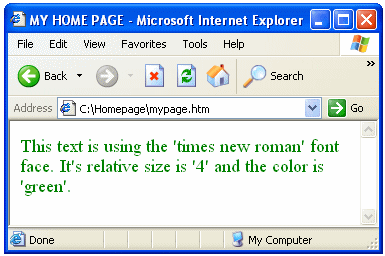
To produce this effect, you place the text you wish to format as such in between the
<font> start tag and the </font> end tag and then you add certain attributes to the <font> start tag. To illustrate, the source code that produces the green text in Example 1A goes like this:Example 1B
<font face="times new roman" size="4" color="green">This text is using the 'times new roman' font face. It's relative size is '4' and the color is 'green'.</font>In Example 1B, the parts of the code highlighted in red are the attributes and associated values applied to this particular
<font> tag. Attributes are always placed within the start tag of an HTML element and normally use this syntax:attribute="value"face, size and color represent attributes while times new roman, 4 and green represent values. Your HTML element start tag compiled with its applicable attributes normally use this syntax:<element attribute1="value" attribute2="value">Each instance of an HTML element start tag may contain one or more different attributes and the attributes can appear in any order. You can think of HTML elements as instructions telling a web browser what to display and the element's attributes as instructions telling a browser how to display it. Note that the
element and the following attribute="value" pair is separated by a space and likewise all succeeding attribute="value" pairs are separated by a space. Concerning attributes, the following standards are optional but highly recommended since future versions of HTML will make them mandatory and, moreover, it is simply 'good grammar':
- Always place double quotation marks ("...") around the value.
- Attribute names should be presented in lower-case.
Different HTML elements generally own different attributes but sometimes share the same attributes. In the case of shared attributes, how the attribute and its respective value applies depends on what element it is used in. HTML attributes, like elements, generally consist of keywords or abbreviations which tend to give a good indication as to what they are used for.
Most HTML elements used in the body of a web page may also contain the following core attributes:
id | Used as a unique identifier for CSS |
class | Used to associate content with a specific CSS class |
style | Used to create an inline CSS style |
title | Used to create a tool-tip (especially useful for hyperlinks) |
Attributes are not always required to accompany HTML elements. Many times, the HTML element alone is enough to create a specific web page effect such as
<p>...</p> (simple paragraph), <br> (forced line break) or <hr> (horizontal rule).Now that you are familiar with HTML elements and attributes, let's move on to learn how to apply them to format text on your web page into various font colors, font sizes and font styles. You will also learn how to block text into paragraphs, create line breaks at will, align your text to the left or right and how to create hyperlinks...
Best Free Stuff
for webmasters
for webmasters
Free Text Editors
Free Graphics Editors
Website Analysis Tools
Free Website Templates
See also:
If you need a .COM web address, you can get one quick and easy at...
| <~ BACK | TOP | NEXT ~> |