Mozilla Firefox
In November 2004, the world was formally introduced to Firefox, a web browser that was a lean, mean version of Mozilla Suite, the open-source descendant of the original Netscape browser. Reportedly born out internal conflict and office politics that constipated development of Mozilla, Firefox took the world by storm to the tune of 1 million downloads on the first day of its official non-beta release, Firefox 1.0.
Firefox was designed specifically to contain only that which was absolutely essential to surf the internet and nothing else and hence it sported a small installation file size and a simple user interface.
Tabbed browsing allows the user to open hyperlinks on a web page in a new browser 'tab', essentially a new page in the same browser window. You switch between pages by clicking on tabs displayed along the top of your browser. This encourages a new kind of web browsing experience where instead of continually drilling down to the next web page effectively replacing the previous page as you surf the net (a.k.a., depth-first browsing), you open 'across' by laying out a succession of tabs (breadth-first browsing) the latter of which lends itself much better to power-surfing.
Here's an excellent discussion about the origin of tabbed browsing.
It also featured tabbed browsing, which at the time was a fairly new concept. And although it didn't pioneer it, Firefox was certainly the first browser to introduce tabbed browsing to many (myself included) as it took only a short year for Firefox to register a 23.6% share in browser usage reports (according to the W3schools browser statistics page). And to give you a greater perspective on this, the next three browsers down on the list at the time (Mozilla, Netscape and Opera) were registering less than 5% in browser usage share combined.
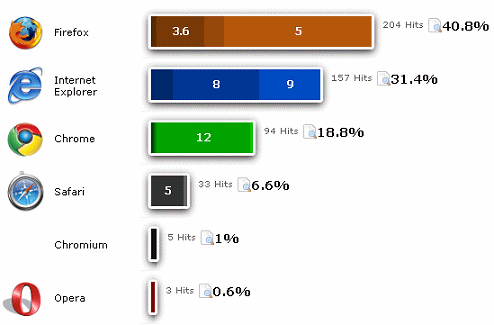
Add to this the fact that Firefox 1 was highly customizable compared with its mighty counterpart of the time, Internet Explorer 6, which could be hardly customized at all, and you can understand why Firefox has now started to overtake Internet Explorer in many browser statistics reports including that for Iron Spider.
Firefox Add-ons
Customization for Firefox, a feature which continues through to the present version, comes in the form of themes which customize the appearance of Firefox (a.k.a., the browser chrome) and extensions which customize how Firefox works which together are now collectively referred to as add-ons.
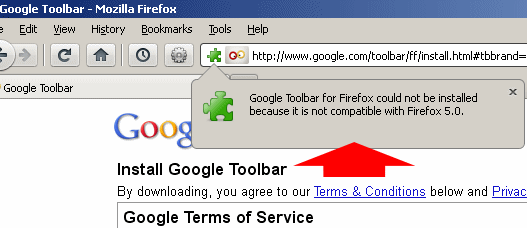
Using Firefox add-ons can be a double-edged sword however in that they are mostly created by third-party developers. Hence, whenever Firefox pumps out a version update to their browser, a whole slew of add-ons typically become glitchy or just downright broken because developers either don't bother to or haven't had a chance to make them compatible with the latest update. Although I have been an avid Firefox fan for many years now, this is one of my biggest pet peeves with this browser.
For example, at the time of this writing, the latest version of Firefox available is Firefox 5.0. This was released on June 21st, 2011 and now almost a full three weeks later, the Google Toolbar has yet to be updated to be compatible. Actually this is surprising coming from Google but in their defense, Firefox 5.0 was released rather quickly and some say, in light of what was actually updated, this version of Firefox didn't actually warrant a version number jump (Firefox 4 was just released three months earlier).
So using Firefox may involve a struggle between the following two:
- Having a secure browsing experience by making sure you stay on top of all latest Firefox updates
OR... - Having a convenient browsing experience by dragging your feet updating Firefox in order to continue enjoying a collection of your favorite add-ons that actually work.
As a webmaster writing about web browsers, I have a certain duty to stick to the former of these two (on my workstation anyway) but I can tell you that it's sometimes a real pain to sacrifice the convenience of having my favorite themes and extensions repeatedly nerfed by the latest and 'greatest' iteration of Firefox.
And on the subject of convenience, here are some links for you:
- Download Firefox 5.0 here
- Firefox 5.0 Release Notes
- Firefox 5.0 System Requirements
- Download any older version of Firefox here
Also, if you're a webmaster I highly recommend that you install the following two extensions, both of which are regularly updated to be compatible with the latest version of Firefox:
More about these extensions and others can be found on my page:
Learn about web hosting without the technobabble!
What is Web Hosting?
Best Free Web Hosting
Affordable Domain Names
Affordable Web Hosting
See also:
How to Make a Web Page
Free Website Templates
If you need a .COM web address, you can get one quick and easy at...
| INTRO | TOP | NEXT ~> |