Create a Web Page 101
Making Web Pages Intro
What is a Web Page?
Why Make a Web Page?
The History of HTML
Learn HTML or XHTML?
Basic HTML
Basic HTML Tutorials
Basic HTML Necessities
How to Make a Web Page
How to Edit a Web Page
The Basics of HTML Tags
Basic HTML Page Structure
HTML Attributes
HTML Font Codes
HTML Font Codes Intro
HTML Font Color Codes
HTML Font Size Codes
HTML Font Style Codes
HTML Bold/Italic Codes
Combining Font Codes
Formatting Text
Formatting Text Intro
Making Paragraphs
Miscellaneous Formatting
Headings & Subheadings
Creating Hyperlinks
Using Graphics
Using Graphics on the Web
Add Graphics to Your Pages
Graphics and Accessibility
How to Align Graphics
Page Color & Background
Graphics as Hyperlinks
Horizontal Rules
Creating Tables
HTML Tables Tutorials
HTML Table Fundamentals
Background & Border Color
Table Frames & Rules
Table Width and Alignment
Cells 1 -Space & Alignment
Cells 2 -Row Column Span
Cells 3 -Width & Height
Making Lists
HTML Frames
HTML Frames Tutorials
Using Frames for Layout
Advanced Frame Layouts
Putting Hyperlinks in Frames
Frame Border Width
Color, Margin and Control
Problems with Frames
SmartFrames: A Solution
SSI: An Alternative to Frames
Web Page Forms
Making Feedback Forms
A Simple Feedback Form
Installing NMS FormMail
Debugging Your Setup
My Web Host is Out to Lunch
User Input Components
Text Fields
Checkboxes & Radio Buttons
Dropdown Menus
Push Buttons
Layout and Presentation
Basic CSS
Basic CSS Tutorials
What is CSS?
Why You Should Use CSS
How to Use CSS
Inline Styles
Embedded Style Sheets
External Style Sheets
Class Selectors
ID Selectors
Combining Selectors
CSS Properties
CSS Properties Intro
Font Styles
Width, Height & Spacing
Borders
Backgrounds
Position
Float & Alignment
Hyperlinks
All About Web Hosting
Hosting Your Own Website
What is a Web Host?
Your Website's Home Page
Building a Website Offline
About Free Web Hosting
Best Free Web Hosting
Commercial Web Hosting
How to Get a Domain Name
Ecommerce Web Hosting
Web Hosting Terminology
Free Web Design Tools
Best Free Website Tools
Best Free Text Editors
Best Free Graphics Editors
Free Website Analysis Tools
Setting Up HTML Kit
HTML Kit Introduction
How to install HTML Kit
Screenshot Breakdown
Basic Configuration
Overall Appearance
Shortcuts and Startup
Editing Window
Customizing Toolbars
Using the Favorites Tab
Making a New Actions Bar
Odds and Ends
Free Templates
Free Website Templates
Two Column Fixed Width
Three Column Liquid Layout
Miscellaneous Templates
Dynamic Menu Effects
Two Column Experimental
Terms of Use
About These Templates
Website Templates Help
Getting Started
Template Zip File Download
How to Edit Your Template
What to Edit in the HTML
How to Add Your Logo
Making a Website
Web Design Tips
Web Design Basics
Tables vs. Tableless
Using Tables for Layout
Example Table Layouts
World's Crappiest Web Page
Twitter Backgrounds
Twitter Backgrounds Intro
Cool Twitter Backgrounds
Cool Twitter Backgrounds 2
Plain Twitter Backgrounds
Dark Twitter Backgrounds
Best Twitter Backgrounds
Cute Twitter Backgrounds
Music Twitter Backgrounds
Music Twitter Backgrounds 2
Twitter Backgrounds 101
TERMS OF USE
All About Web Browsers
What is a Web Browser?
Mozilla Firefox
Internet Explorer
Opera
How to Set Up Firefox
Top 5 Firefox Extensions
Contact
My Web Host is Out to Lunch
cgi-bin, and Yes, I could run Perl scripts but, No, they did not know the path to Perl. (No kidding.) If you're trying to install NMS FormMail and your web host's technical support is similarily "out to lunch" (either literally or figuratively) but you know you have a
cgi-bin then don't give up just yet. YOU ARE YOUR OWN TECHNICAL SUPPORT.Now..
Bravely step forward, take a deep breath, yell "I'm as mad as hell and I'm not going to take it anymore!" (optional) and then try the following steps to derive the correct path to Perl (a.k.a. shebang line). This will then allow you to run a special Perl script which will guess the correct path to Sendmail.
(If you already know the path to Perl and are now just trying to get your path to Sendmail, click here.)
Okay let's do it to it...
- Copy and paste the simple "Hello World" test script that appears below into a good text editor (like Metapad) that can convert text to Unix line endings.
- Save this script as
test.plusing UNIX LINE ENDINGS. (To convert to Unix line endings in Metapad, press Ctrl + 2 on your keyboard.) - Upload
test.plto yourcgi-bindirectory (or your website's equivalent likecgiorcgi-lib). Make sure you upload it in ASCII MODE (instead of binary). - Use the
chmodcommand in your FTP program or use your website's control panel to change the file permissions oftest.plto 755 (rwx r-x r-x). - Type
http://www.your_site.com/cgi-bin/test.plinto the address bar of your browser and hit GO. (Replacewww.your_site.comwith your domain name.) - Your web browser should now display a blank page with the words "hello world!" printed on it.
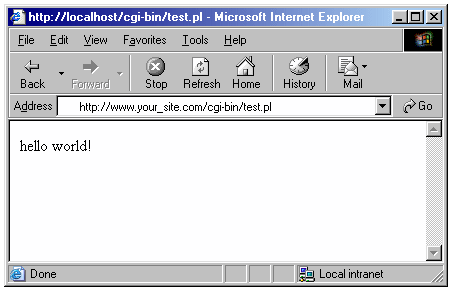
IF THIS WORKED:
The first line of code in thetest.plscript that is currently in yourcgi-binis the correct path to the Perl interpreter installed on your web server's computer. Save this version of test.pl to your hard drive for future reference and then continue on to step #7 below.IF THIS DID NOT WORK:
The first line of code in thetest.plscript that is currently in yourcgi-binis probably not the correct path to the Perl interpreter installed on your web server's computer. Go back to step #1 and click on the "Switch shebang line" button. Then repeat steps 1 through 6. - Okay now that we have the correct path to Perl, we can run Perl scripts on your website. So altogether now— "Yeah? And?" (*chuckle*) Well, as fortune would have it, there is a free Perl script out there to be had that can be used to derive the correct path to Sendmail. Visit the good people at perlscriptsjavascripts.com and download your free copy of e-Vars, a neat little program which will —among other things— make a pretty good attempt at guessing your web server's path to Sendmail.
- After downloading and unpacking the
vars.zipfile, upload it to your cgi-bin and then use thechmodcommand in your FTP program or use your website's control panel to change the file permissions ofmyserver.cgito 755 (you should be familiar with this process by now). - Type
http://www.your_site.com/cgi-bin/myserver.cgiinto the address bar of your browser and hit GO. (Replacewww.your_site.comwith your domain name.) - Your web browser should now display a detailed list of environment variables as well as the Path(s) to Sendmail configured on your web server.
And there ya go.
Technical support? ...Bah!
We don't need no stinkin' technical support!!!

Best Free Stuff
for webmasters
for webmasters
Free Text Editors
Free Graphics Editors
Website Analysis Tools
Free Website Templates
See also:
If you need a .COM web address, you can get one quick and easy at...
| <~ BACK | TOP | NEXT ~> |